
# Tree Shaking
tree shaking 是一个术语,通常用于描述移除 JavaScript 上下文中的未引用代码(dead-code)。它依赖于 ES2015 模块语法的 静态结构 特性,例如 import 和 export。这个术语和概念实际上是由 ES2015 模块打包工具 rollup 普及起来的。
src/math.js
export function add(a, b) {
  return a + b
}

export function minus(a, b) {
  return a - b
}
src/index.js
import { add } from './math'

add(1, 2)
webpack.config.js
const path = require('path');
const HtmlWebpackPlugin = require('html-webpack-plugin');
const { CleanWebpackPlugin } = require('clean-webpack-plugin');

module.exports = {
  mode: 'development',
  devtool: 'cheap-module-source-map',
  entry: './src/index.js',
  output: {
    filename: '[name].js',
    path: path.resolve(__dirname, 'dist')
  },
  target: 'web',
  plugins: [
    new HtmlWebpackPlugin({
      template: 'src/index.html'
    }),
    new CleanWebpackPlugin()
  ]
}
查看打包后的文件:
dist/main.js
((__unused_webpack_module, __webpack_exports__, __webpack_require__) => {

__webpack_require__.r(__webpack_exports__);
/* harmony export */ __webpack_require__.d(__webpack_exports__, {
/* harmony export */   "add": () => (/* binding */ add),
/* harmony export */   "minus": () => (/* binding */ minus)
/* harmony export */ });
function add(a, b) {
  return a + b
}

function minus(a, b) {
  return a - b
}
/***/ })
发现虽然我们没有在 index.js 文件引入 minus 方法,但是打包后的文件中还是引入了 minus 这个方法。
修改 webpack.config.js 文件
const path = require('path');
const HtmlWebpackPlugin = require('html-webpack-plugin');
const { CleanWebpackPlugin } = require('clean-webpack-plugin');

module.exports = {
  mode: 'development',
  devtool: 'cheap-module-source-map',
  entry: './src/index.js',
  output: {
    filename: '[name].js',
    path: path.resolve(__dirname, 'dist')
  },
  target: 'web',
  optimization: {
    usedExports: true,
  },
  plugins: [
    new HtmlWebpackPlugin({
      template: 'src/index.html'
    }),
    new CleanWebpackPlugin(),
  ]
}
查看打包后的文件
((__unused_webpack_module, __webpack_exports__, __webpack_require__) => {

/* harmony export */ __webpack_require__.d(__webpack_exports__, {
/* harmony export */   "add": () => (/* binding */ add)
/* harmony export */ });
/* unused harmony export minus */
function add(a, b) {
  return a + b
}

function minus(a, b) {
  return a - b
}

/***/ })
虽然我们配置了 tree-shaking 但是 minus 方法还是被打包进去了,这是因为当前我们是在开发环境下,如果把这些代码都去掉会导致 soure-map 不准确,不方便开发、调试。
生产环境:
// webpack.config.js

const path = require('path');
const HtmlWebpackPlugin = require('html-webpack-plugin');
const { CleanWebpackPlugin } = require('clean-webpack-plugin');

module.exports = {
  mode: 'production',
  entry: './src/index.js',
  output: {
    filename: '[name].js',
    path: path.resolve(__dirname, 'dist')
  },
  target: 'web',
  optimization: {
    usedExports: true,
  },
  plugins: [
    new HtmlWebpackPlugin({
      template: 'src/index.html'
    }),
    new CleanWebpackPlugin()
  ]
}
查看打包后的文件,是不是干净的令人发指😄 :
// dist/main.js

(()=>{"use strict";console.log(3)})();
# side-effect
在一个纯粹的 ESM 模块世界中,很容易识别出哪些文件有 side effect。然而,我们的项目无法达到这种纯度,
比如我们导入了一些地方库 import _ from 'loadash',或者样式文件 import './index.css' 所以,此时有必要提示 webpack compiler 哪些代码是“纯粹部分”。
我们可以通过 package.json 的 "sideEffects" 属性,来实现。
{
  "name": "your-project",
  // 设置为 false 表示代码中不包含 side effect,可以安全的删除未用到的 export
  "sideEffects": false
}
TIP
"side effect(副作用)" 的定义是,在导入时会执行特殊行为的代码,而不是仅仅暴露一个 export 或多个 export。举例说明,例如 polyfill,它影响全局作用域,并且通常不提供 export。
如果代码确实有一些副作用,可以改为提供一个数组:
{
  "name": "your-project",
  "sideEffects": ["./src/some-side-effectful-file.js"]
}
sideEffects 和 usedExports(更多被认为是 tree shaking)是两种不同的优化方式。
sideEffects 更为有效 是因为它允许跳过整个模块/文件和整个文件子树。
usedExports 依赖于 terser 去检测语句中的副作用。它是一个 JavaScript 任务而且没有像 sideEffects 一样简单直接。而且它不能跳转子树/依赖由于细则中说副作用需要被评估。尽管导出函数能运作如常,但 React 框架的高阶函数(HOC)在这种情况下是会出问题的。 具体详见官方文档 解释 tree shaking 和 sideEffects (opens new window)
文末推荐一篇文章 你的Tree-Shaking并没什么卵用 (opens new window) 技术在不断更新,文章中的一些描述已经过时了,但还是可以参考参考的,就当看 "历史书" 吧。
# 区分开发模式和生产模式
npm install --save-dev webpack-merge
src/math.js
export function add(a, b) {
  return a + b
}

export function minus(a, b) {
  return a - b
}
src/index.js
import './index.scss'
import { add } from './math'

let a = add(1, 2)
console.log(a)
webpack.common.js
const path = require('path');
const HtmlWebpackPlugin = require('html-webpack-plugin');
const { CleanWebpackPlugin } = require('clean-webpack-plugin');

module.exports = {
  entry: './src/index.js',
  output: {
    filename: '[name].js',
    path: path.resolve(__dirname, 'dist')
  },
  target: 'web',
  module: {
    rules: [
      {
        test: /\.s[ac]ss$/i,
        use: ["style-loader",
        {
          loader: "css-loader",
          options: {
            modules: true
          }
        },
        "sass-loader", "postcss-loader"],
      }
    ]
  },
  plugins: [
    new HtmlWebpackPlugin({
      template: 'src/index.html'
    }),
    new CleanWebpackPlugin()
  ]
}
webpack.dev.js
const webpack = require('webpack')
const { merge } = require('webpack-merge')
const common = require('./webpack.common.js')

module.exports = merge(common, {
  mode: 'development',
  devtool: 'cheap-module-source-map',
  devServer: {
    contentBase: './dist',
    port: 8085,
    hot: true,
    hotOnly: true
  },
  plugins: [
    new webpack.HotModuleReplacementPlugin()
  ]
})
webpack.prod.js
const { merge } = require('webpack-merge')
const common = require('./webpack.common.js')

module.exports = merge(common, {
  mode: 'production',
  optimization: {
    usedExports: true
  }
})
package.json
"scripts": {
  "test": "echo \"Error: no test specified\" && exit 1",
  "start": "webpack serve --open --config webpack.dev.js",
  "build": "webpack --config webpack.prod.js"
}
# CodeSplitting
代码分离把代码分离到不同的 bundle 中,然后可以按需加载或并行加载这些文件。代码分离可以用于获取更小的 bundle,以及控制资源加载优先级,如果使用合理,会极大影响加载时间。
- 入口起点:使用 entry 配置手动地分离代码。
- 防止重复:使用 Entry dependencies 或者 SplitChunksPlugin 去重和分离 chunk。
- 动态导入:通过模块的内联函数调用来分离代码。
# 入口起点
这种方式实际就是我们前面提到的配置 多入口文件 这里不再赘述。
src/index.js
import _ from 'lodash'
src/math.js
import _ from 'lodash'
webpack.common.js
entry: {
  index: './src/index.js',
  math: './src/math.js'
},
查看打包后的文件大小
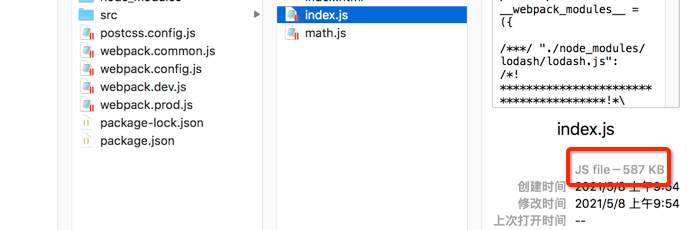
index.js 文件和 math.js 文件的大小都是 587 KB ,我们在这两个文件中除了引入 lodash 外,并没有这么做其他操作,说明打包后的文件都把 lodash 库打包进去了。
这种方式虽然手动实现了代码分离,但是存在一些问题,如:
- 如果入口 chunk 之间包含一些重复的模块,那些重复模块都会被引入到各个 bundle 中。
- 这种方法不够灵活,并且不能动态地将核心应用程序逻辑中的代码拆分出来。
# 防止重复
配置 dependOn option 选项,这样可以在多个 chunk 之间共享模块。
对 webpack 配置文件做如下修改:
// webpack.common.js

entry: {
  index: {
    import: './src/index.js',
    dependOn: 'shared',
  },
  math: {
    import: './src/math.js',
    dependOn: 'shared',
  },
  shared: 'lodash'
}
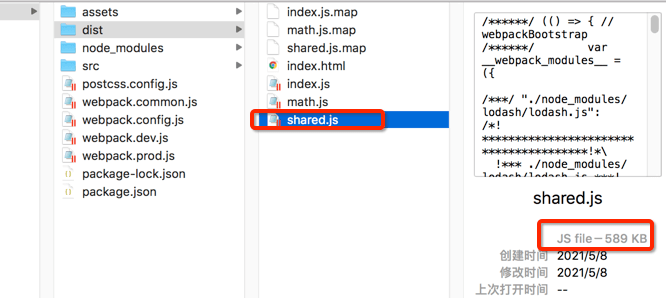
重新执行打包命令,查看 dist 目录,可以看到多了一个 shared 文件夹。 index.js 和 math.js 文件体积大大减少了。
要在一个 HTML 页面上使用多个入口时,还需设置 optimization.runtimeChunk: 'single',不然可能会出现 问题 (opens new window)
webpack.common.js
optimization: {
  runtimeChunk: 'single',
},
# SplitChunksPlugin
webpack.common.js
optimization: {
  splitChunks: {
    // 有效值为 all,async 和 initial
    chunks: 'all',
  },
}
运行打包命令,从控制台输出可以看出 lodash 被单独打包成了 vendors-node_modules_lodash_lodash_js.js 文件
asset vendors-node_modules_lodash_lodash_js.js 532 KiB [emitted] (id hint: vendors) 1 related asset
asset index.js 44.1 KiB [emitted] (name: index) 1 related asset
asset math.js 44.1 KiB [emitted] (name: math) 1 related asset
asset index.html 283 bytes [emitted]
Entrypoint index 576 KiB (674 KiB) = vendors-node_modules_lodash_lodash_js.js 532 KiB index.js 44.1 KiB 2 auxiliary assets
Entrypoint math 576 KiB (674 KiB) = vendors-node_modules_lodash_lodash_js.js 532 KiB math.js 44.1 KiB 2 auxiliary assets
runtime modules 57.4 KiB 28 modules
cacheable modules 532 KiB
  ./src/index.js 97 bytes [built] [code generated]
  ./src/math.js 82 bytes [built] [code generated]
  ./node_modules/lodash/lodash.js 531 KiB [built] [code generated]
webpack 5.36.2 compiled successfully in 356 ms
默认配置项
module.exports = {
  //...
  optimization: {
    splitChunks: {
      // 表明将选择哪些 chunk 进行优化
      chunks: 'async',
      // 生成 chunk 的最小体积
      minSize: 20000,
      // 在 webpack 5 中引入了 splitChunks.minRemainingSize 选项,通过确保拆分后剩余的最小 chunk 体积超过限制来避免大小为零的模块。 'development' 模式 中默认为 0。对于其他情况,splitChunks.minRemainingSize 默认为 splitChunks.minSize 的值,因此除需要深度控制的极少数情况外,不需要手动指定它。
      minRemainingSize: 0,
      // 拆分前必须共享模块的最小 chunks 数
      minChunks: 1,
      // 按需加载时的最大并行请求数
      maxAsyncRequests: 30,
      // 入口点的最大并行请求数
      maxInitialRequests: 30,
      // 强制执行拆分的体积阈值和其他限制,(minRemainingSize,maxAsyncRequests,maxInitialRequests)将被忽略
      enforceSizeThreshold: 50000,
      // 缓存组可以继承和/或覆盖来自 splitChunks.* 的任何选项。但是 test、priority 和 reuseExistingChunk 只能在缓存组级别上进行配置。将它们设置为 false以禁用任何默认缓存组。
      cacheGroups: {
        defaultVendors: {
          // 控制此缓存组选择的模块。省略它会选择所有模块。它可以匹配绝对模块资源路径或 chunk 名称。匹配 chunk 名称时,将选择 chunk 中的所有模块。
          test: /[\\/]node_modules[\\/]/,
          // 一个模块可以属于多个缓存组。优化将优先考虑具有更高 priority(优先级)的缓存组。默认组的优先级为负,以允许自定义组获得更高的优先级(自定义组的默认值为 0)
          priority: -10,
          // 如果当前 chunk 包含已从主 bundle 中拆分出的模块,则它将被重用,而不是生成新的模块。这可能会影响 chunk 的结果文件名。
          reuseExistingChunk: true,
        },
        default: {
          minChunks: 2,
          priority: -20,
          reuseExistingChunk: true,
        },
      },
    },
  },
};
# 动态导入
动态代码拆分有两种:
- 使用符合 ECMAScript 提案 的 import() 语法 来实现动态导入
- 使用 webpack 特定的 require.ensure(require.ensure() 是 webpack 特有的,已被 import() 取代。)
WARNING
import() 调用会在内部用到 promises。如果在旧版本浏览器中(例如,IE 11)使用 import(),记得使用一个 polyfill 库(例如 es6-promise 或 promise-polyfill),来 shim Promise。
// src/index.js

const { default: _ } = import('lodash')
TIP
之所以需要 default,是因为 webpack 4 在导入 CommonJS 模块时,将不再解析为 module.exports 的值,而是为 CommonJS 模块创建一个 artificial namespace 对象
从控制台输出,可以看出 lodash 被单独打包了。
asset vendors-node_modules_lodash_lodash_js.js 532 KiB [emitted] (id hint: vendors) 1 related asset
asset index.js 46.6 KiB [emitted] (name: index) 1 related asset
asset index.html 176 bytes [emitted]
runtime modules 30.7 KiB 15 modules
cacheable modules 532 KiB
  ./src/index.js 336 bytes [built] [code generated]
  ./node_modules/lodash/lodash.js 531 KiB [built] [code generated]
webpack 5.36.2 compiled successfully in 334 ms
# SplitChunksPlugin
# 懒加载
代码懒加载实际上是先把代码在一些逻辑断点处分离开,然后在一些代码块中完成某些操作后,立即引用或即将引用另外一些新的代码块。这样加快了应用的初始加载速度,减轻了它的总体体积,因为某些代码块可能永远不会被加载。
src/math.js
console.log(
  'math.js module has loaded! See the network tab in dev tools...'
);

export function add(a, b) {
  console.log('加法操作的结果', a + b)
  return a + b
}

export default function minus(a, b) {
  console.log('减法操作的结果', a - b)
  return a - b
}
src/index.js
document.body.onclick = function() {
  import(/* webpackChunkName: "math" */ './math.js').then(module => {
    const minus = module.default
    const add = module.add

    add(1, 2)
    minus(3, 1)
  });
}
当我们点击 body 的时候会加载打包后的 math.js 文件。
# PreLoading 和 Prefetching
webpack v4.6.0+ 增加了对预获取和预加载的支持。
- prefetch(预获取):将来某些导航下可能需要的资源
- preload(预加载):当前导航下可能需要资源
prefetch 和 preload 的使用非常简单,只需要在 import 语法加点东西就行。
src/index.js
async function getComponent() {
  const { default: _ }  = await import(/* webpackPrefetch: true */ 'lodash')
}

document.body.onclick = () => {
  getComponent()
}
当我们点击 body 的时候会加载 lodash 库。
查看网页代码,在 head 中添加了如下代码:
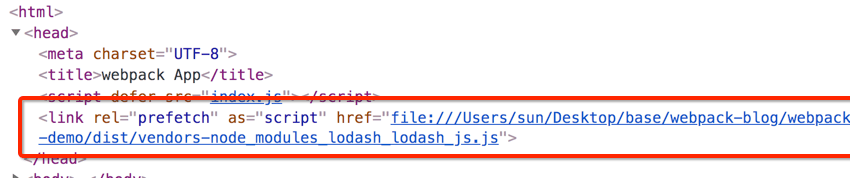
指示着浏览器在闲置时间预取 lodash.js 文件。
PreLoading 和 Prefetching 的用法差不多,这里不再赘述。
TIP
不正确地使用 webpackPreload 会有损性能,请谨慎使用。
prefetch 指令和 preload 指令的不同之处:
- preload chunk 会在父 chunk 加载时,以并行方式开始加载。prefetch chunk 会在父 chunk 加载结束后开始加载。
- preload chunk 具有中等优先级,并立即下载。prefetch chunk 在浏览器闲置时下载。
- preload chunk 会在父 chunk 中立即请求,用于当下时刻。prefetch chunk 会用于未来的某个时刻。
- 浏览器支持程度不同。
# CSS代码分割
src/index.scss
body {
  background-color: blue;
}
src/index.js
import './index.scss'
执行打包命令后,查看打包后的文件夹,可以看到 css 被打包进了 js 文件中
dist/index.js
// ...
___CSS_LOADER_EXPORT___.push([module.id, "body {\n  background-color: blue;\n  width: 100%;\n  height: 100%;\n}", "",{"version":3,"sources":["webpack://./src/index.scss"],"names":[],"mappings":"AAAA;EACE,sBAAA;EACA,WAAA;EACA,YAAA;AACF","sourcesContent":["body {\n  background-color: blue;\n  width: 100%;\n  height: 100%;\n}"],
"sourceRoot":""}]);
// ...
安装
npm install --save-dev mini-css-extract-plugin
webpack.common.js
const { merge } = require('webpack-merge');
const common = require('./webpack.common.js');
const MiniCssExtractPlugin = require('mini-css-extract-plugin');

module.exports = merge(common, {
	mode: 'production',
	output: {
		filename: '[name].[contenthash].js'
	},
	module: {
		rules: [
			{
				test: /\.s[ac]ss$/i,
				use: [
          MiniCssExtractPlugin.loader,
          'css-loader',
          'sass-loader',
          'postcss-loader'
        ]
			}
		]
	},
	optimization: {
		usedExports: true
	},
	plugins: [
		new MiniCssExtractPlugin({
			filename: '[name].[contenthash].css'
		})
	]
});
# 浏览器缓存
src/index.js
import _ from 'lodash'
webpack.prod.js
const path = require('path')
const { merge } = require('webpack-merge')
const common = require('./webpack.common.js')

module.exports = merge(common, {
  mode: 'production',
  output: {
    filename: '[name].[contenthash].js',
    path: path.resolve(__dirname, 'dist')
  },
  optimization: {
    usedExports: true
  }
})
# ProvidePlugin
src/theme.js
export function setTheme() {
  $('body').css('background', 'orange')
}
src/index.js
import { setTheme } from  './theme'
import $ from 'jquery'

setTheme()

$('#root').append('hello jq')
打包后运行项目,发现浏览器控制台报错了

因为我们没有在 theme.js 中引入 jquery。我们可以使用 ProvidePlugin 来解决这个问题,使用 ProvidePlugin 可以自动加载模块,而不是必须在任何地方通过 import 或者 require 导入模块。
webpack.common.js
const path = require('path')
const webpack = require('webpack')
const HtmlWebpackPlugin = require('html-webpack-plugin')
const { CleanWebpackPlugin } = require('clean-webpack-plugin')

module.exports = {
  entry: {
    index: './src/index.js'
  },
  output: {
    filename: '[name].js',
    path: path.resolve(__dirname, 'dist')
  },
  target: 'web',
  optimization: {
    splitChunks: {
      chunks: 'all',
    },
  },
  plugins: [
    new HtmlWebpackPlugin({
      template: 'src/index.html'
    }),
    new webpack.ProvidePlugin({
      $: 'jquery'
    }),
    new CleanWebpackPlugin()
  ]
}
再次打包运行,页面运行成功了。

# 全局this指向
imports loader 允许使用依赖于特定全局变量的模块。
安装
npm install imports-loader --save-dev
← Webpack核心 Webpack性能优化 →