
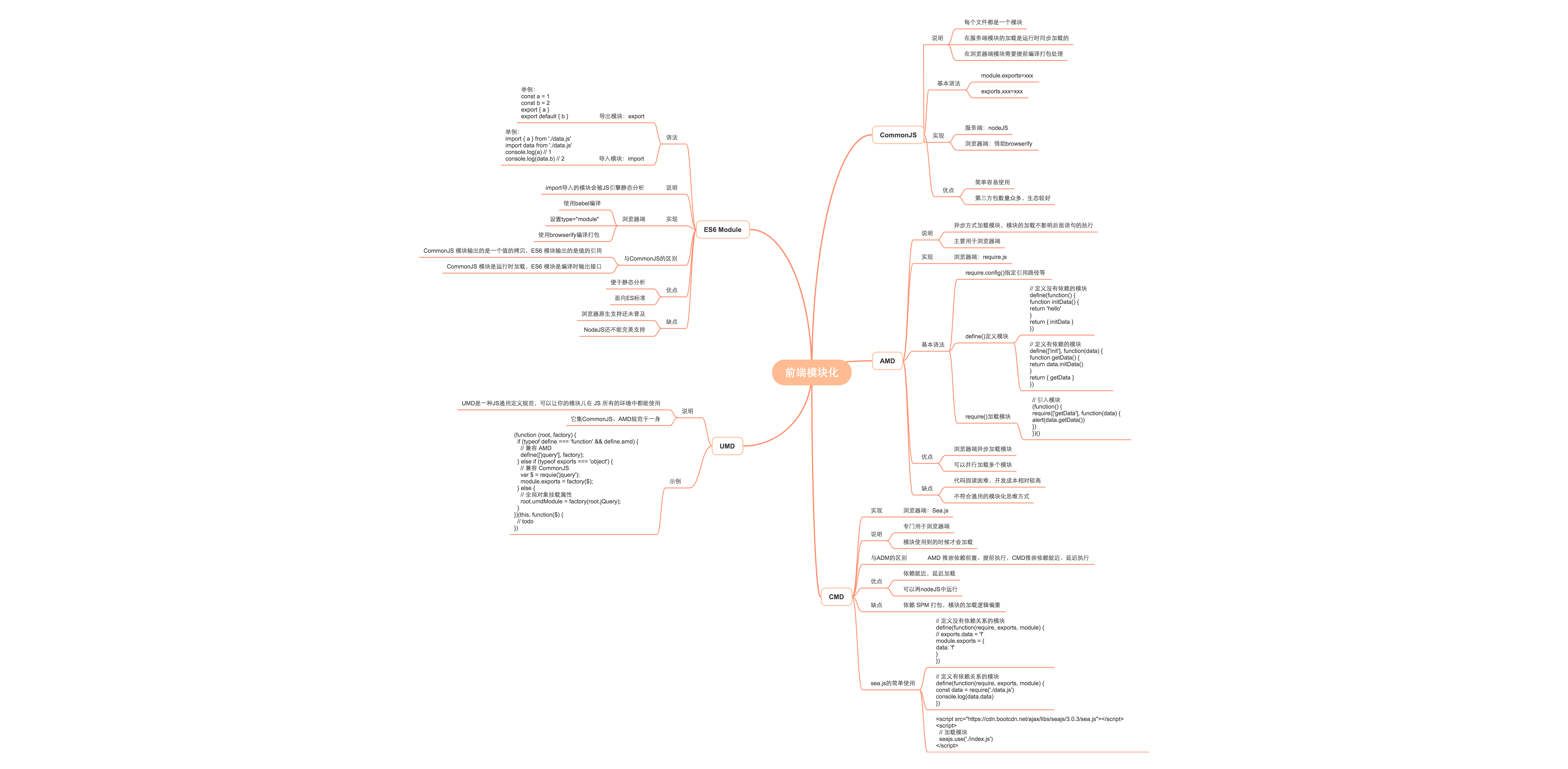
 前端用到的模块解决方案通常有CommonJS、AMD、CMD、UMD、ES6 Module等,这里对它们分别做一个简单的介绍。
# CommonJS
CommonJS加载模块是同步的。
CommonJS模块的加载机制是,输入的是被输出的值的拷贝。也就是说,一旦输出一个值,模块内部的变化就影响不到这个值。
// count.js
let count = 1

function increase() {
  count += 1
}

module.exports = {
  count,
  increase
}
// index.js
const { count, increase } = require('./count')
console.log(count) // 1
increase()
console.log(count) // 1
上述代码表明 count 被导出后,count 模块内部的变化影响不到外部导出的 count 值,这是因为 count 是一个原始类型的值,会被缓存。下面我们把 count 当成引用类型的属性再看看输出结果:
// count.js
let obj = {
  count: 1
}

function increase() {
  obj.count += 1
}

module.exports = {
  obj,
  increase
}
// index.js
const { obj, increase } = require('./count')
console.log(obj.count) // 1
increase()
console.log(obj.count) // 2
# AMD
CommonJS规范加载模块是同步的,也就是说,只有加载完成,才能执行后面的操作。AMD规范则是非同步加载模块,允许指定回调函数。由于Node.js主要用于服务器编程,模块文件一般都已经存在于本地硬盘,所以加载起来比较快,不用考虑非同步加载的方式,所以CommonJS规范比较适用。但是,如果是浏览器环境,要从服务器端加载模块,这时就必须采用非同步模式,因此浏览器端一般采用AMD规范。此外AMD规范比CommonJS规范在浏览器端实现要来着早。
未使用AMD
// init.js
(function(window) {
  function initData() {
    return 'hello'
  }
  window.initData = initData
})(window)
// getData.js
(function(window) {
  function getData() {
    return initData()
  }
  window.getData = getData
})(window)
// index.js
(function(window) {
  alert(getData())
})(window)
<!-- index.html -->
<!DOCTYPE html>
<html lang="en">
<head>
  <meta charset="UTF-8">
  <meta http-equiv="X-UA-Compatible" content="IE=edge">
  <meta name="viewport" content="width=device-width, initial-scale=1.0">
  <title>Document</title>
</head>
<body>
  <script src="./init.js"></script>
  <script src="./getData.js"></script>
  <script src="./index.js"></script>
</body>
</html>
上面的代码在加载 JS 文件的时候会发送多个请求,请求多个 JS 文件,其次引入的js文件顺序不能搞错,否则会报错。
下面看下使用 AMD 模块:
// init.js
define(function() {
  function initData() {
    return 'hello'
  }
  return { initData }
})
// getData.js
define(['init'], function(data) {
  function getData() {
    return data.initData()
  }
  return { getData }
})
// init.js
(function() {
  require(['getData'], function(data) {
    alert(data.getData())
  })
})()
<!-- index.html -->
<!DOCTYPE html>
<html lang="en">
<head>
  <meta charset="UTF-8">
  <meta http-equiv="X-UA-Compatible" content="IE=edge">
  <meta name="viewport" content="width=device-width, initial-scale=1.0">
  <title>Document</title>
</head>
<body>
  <script src="https://cdn.bootcdn.net/ajax/libs/require.js/2.3.6/require.js"></script>
  <script src="./index.js"></script>
</body>
</html>
AMD模块定义的方法非常清晰,不会污染全局环境,能够清楚地显示依赖关系。但是对比上面的 CommonJS 规范来看,AMD 这种方式代码不便理解,使用也不方便。
# CMD
主要用于浏览器,模块的加载是异步的,模块使用时才会加载执行。典型代表 sea.js (opens new window) 。
它与AMD很类似,不同点在于:AMD 推崇依赖前置、提前执行,CMD推崇依赖就近、延迟执行。
// data.js
define(function(require, exports, module) {
  // 下面两种导出方式都可以
  // exports.data = 'f'
  module.exports = {
    data: 'f'
  }
})
// index.js
define(function(require, exports, module) {
  const data = require('./data.js')
  console.log(data.data)
})
<!DOCTYPE html>
<html lang="en">
<head>
  <meta charset="UTF-8">
  <meta http-equiv="X-UA-Compatible" content="IE=edge">
  <meta name="viewport" content="width=device-width, initial-scale=1.0">
  <title>Document</title>
</head>
<body>
  <script src="https://cdn.bootcdn.net/ajax/libs/seajs/3.0.3/sea.js"></script>
  <script>
    seajs.use('./index.js')
  </script>
</body>
</html>
从上面的使用方式看是不是有些类似 CommonJS 规范。
# UMD
上面介绍的这几种模块解决方案,要不主要针对的是浏览器端,要不主要针对的服务端。有没有一种既能在浏览器端用也能在服务端用的方式呢?毕竟一套代码可以多端运行那得多爽。下面我们来说一下 UMD 这种模块方式。
UMD(Universal Module Definition) 是一种JS通用定义规范,可以让你的模块儿在 JS 所有的环境中都能使用。它集CommonJS、AMD规范于一身。来看一个下它的实现:
(function (root, factory) {
  if (typeof define === 'function' && define.amd) {
    // 兼容 AMD
    define(['jquery'], factory);
  } else if (typeof exports === 'object') {
    // 兼容 CommonJS
    var $ = requie('jquery');
    module.exports = factory($);
  } else {
    // 全局对象挂载属性
    root.umdModule = factory(root.jQuery);
  }
})(this, function($) {
  // todo
})
随着 ES Module 的普及,UMD 这种模块方式也将慢慢过时。
# ES6 模块
// data.js
export {
  name: 'f'
}
// index.js
import { name } from './data.js'
上面这种用法是不是很熟悉?它就是我们所说的 ES Module 。这种方式这里就不多做介绍了,因为目前前端开发使用的基本都是这种,一些简要知识可以看下开篇的大纲图。
参考:
可能是最详细的UMD模块入门指南 (opens new window)